
Nginx 429 vs 502 during an HTTP spike: diagnose before you rate limit
A surge can produce both 429 and 502 responses, but they describe different failures. Trace the source of each response before changing a live protection rule.

First answer: what do 429 and 502 actually tell you?
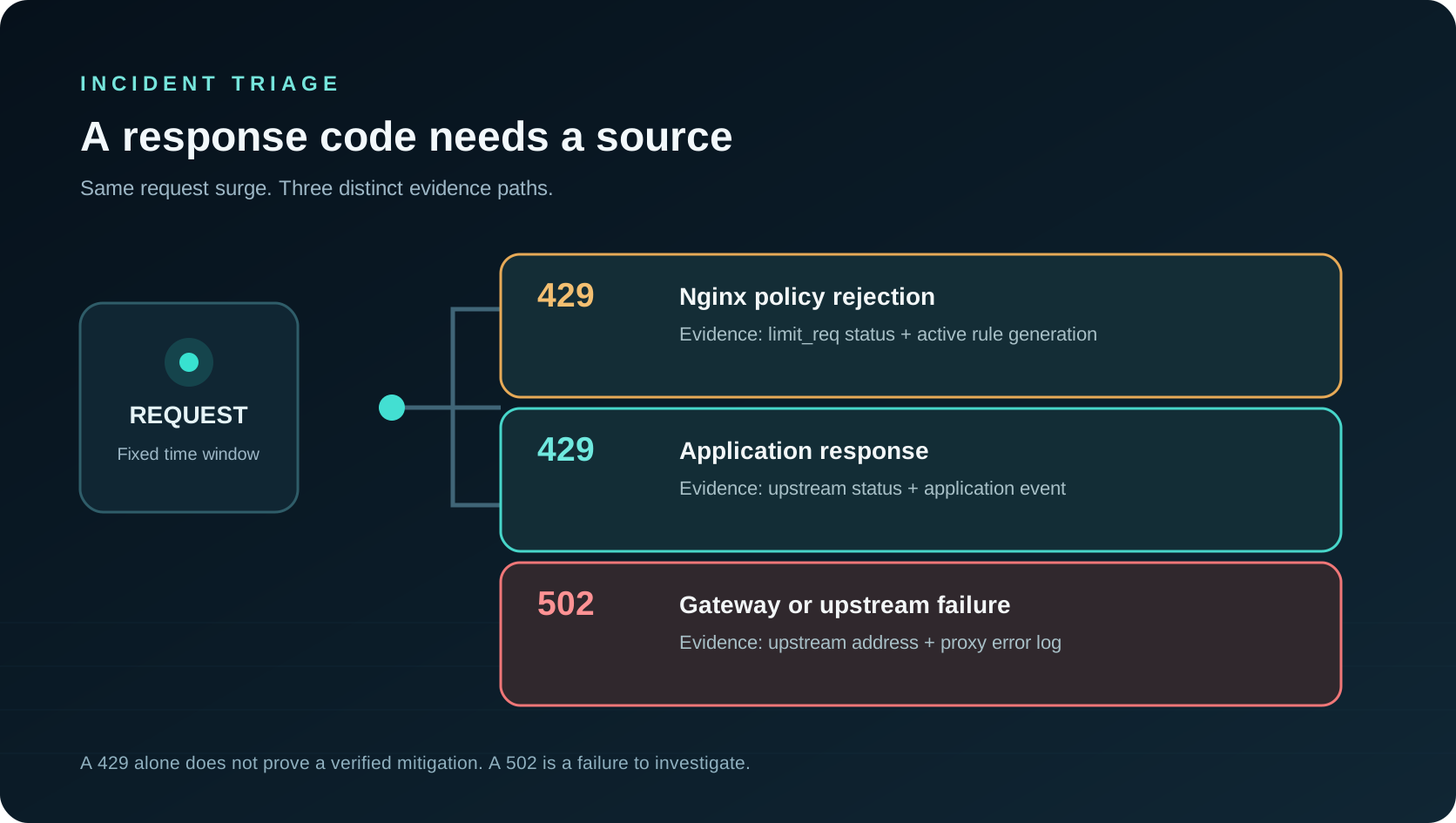
A 429 means a client received a response saying it made too many requests. It does not, on its own, identify the component that issued it. Your application can send a 429, an upstream gateway can send one, or Nginx can return a configured status after a limit_req rejection. A 502 points to a gateway or upstream failure path; investigate whether the proxy could connect, read valid headers, or reach a healthy backend. Neither code proves that traffic was malicious. During one incident, a protection rule can reject some clients while an unhealthy backend returns 502 to entirely different clients. Treat the two populations as separate until evidence joins them.
The distinction changes the first action. If the 429 cohort is mostly signed-in customers, loosening or removing a recent rate rule may restore service faster than adding capacity. If 502s began before the request surge, a crashed process or bad deployment may be the cause and extra throttling may only conceal it. If both rise after one costly route is flooded, you may need a temporary, route-specific control and an upstream repair at the same time. Start with a fixed time window, the affected host and path, then compare response status, source component, latency and client group. A site-wide error total alone is not enough.
Log the cause, not only the HTTP status
A useful access record includes the final status, request time, normalized site and route, trusted client address, upstream address and upstream status when applicable, plus a request identifier that can join proxy and application logs. For a Nginx limit_req policy, the $limit_req_status variable distinguishes passed, delayed and rejected requests; dry-run states are also visible. Log a deployed policy identifier and configuration generation alongside its scope if your deployment system can supply them. That is the difference between “there were 4,000 429s” and “rule R rejected 1,800 requests on /search during this interval.” Do not infer the second statement from the first.
Keep provenance across restarts and rollbacks. When a worker reload fails, a dashboard that merely says “enabled” can be dangerously reassuring; the old configuration may still be serving requests. Record the intent to apply, validation result, reload result, active generation and observed match counter as distinct events. An application-generated 429 has no Nginx rule match. A 502 may have an upstream connection error, timeout or invalid response in the error log. Correlating those lines with the access log is more useful than painting the whole chart red. Hostwatch's public module description explains its evidence-to-action boundary; the operational principle is that classification and enforcement need separate proof.

A five-minute triage sequence for a noisy route
Freeze the time range at the first deviation and identify the affected route. Compare requests per five minutes with successful responses, 429s, 502s, upstream latency and host CPU or memory. Then check the configuration change history: was a rate policy installed just before the error curve moved, or did the application fail first? Segment by client cohort where your logs support it. Public visitors, an identified internal service, a verified crawler and an unknown caller should not be silently combined. Keep the window identical across the charts. A minute offset or different timezone can manufacture a causal story that is not there.
Next inspect a bounded set of exact requests and error records. Are the failing requests concentrated on one query-heavy endpoint? Do 502s appear on unrelated routes? Are the same addresses receiving 429s and later retrying harder? Compare ordinary customer journeys rather than only suspect traffic: login, checkout, search and static assets. The key decision is whether the origin is exhausted, the control is too broad, or both. If the available request rows are only recent examples, label them as examples and use full-window counters for scale. Never divide a full-day request total by a 200-row sample and call the result a rate of attack.
Choose a rate-limit key and route scope deliberately
Nginx limit_req uses a key and a shared memory zone to track request rates. A common key is the binary remote address; it is compact, but a shared office, mobile carrier or NAT can put many legitimate people behind one address. Trust the real client address only through an explicitly configured proxy chain. Do not use an unvalidated forwarding header supplied by arbitrary clients. A global per-address limit is easy to deploy and easy to regret: a homepage, a browser asset burst and an expensive report endpoint do not have the same cost. Begin with the smallest route or route family causing pressure, then choose a burst allowance that reflects normal browser behavior.
If the objective is to slow attack-like enumeration, rate alone is too weak a definition. Consider path diversity, repeated misses, response cost, short-lived client history and whether the request belongs to an authenticated session. Preserve an unknown category when identity is incomplete. Country or provider can help prioritize investigation, but a blanket regional block can discard paying users and still miss distributed attacks. Make exceptions explicit and short-lived; verify claimed crawler identity rather than trusting its User-Agent text. A policy should state target, key, threshold, burst, expiration, expected good-traffic impact and rollback plan. Review these fields before it can touch a live gateway.

Use dry run and staged enforcement to protect real users
Nginx supports limit_req_dry_run: it accounts for requests that would be excessive without limiting their processing. This is a practical way to measure a candidate threshold against live traffic. Review projected matches by route, client grouping and response outcome; identify real sessions that would have been affected. Then enable a short-lived rule with a conservative burst, watch the active generation, and compare the next complete interval with a baseline. A rule should be reversible by an operator who did not author it. Keep the previous known-good configuration and validate syntax before reload. A failed reload must be reported as failed, not as a silent success.
Measurement needs two sides. Count verified rule matches and also count successful requests, conversion-critical route completions, upstream errors and latency for ordinary users. A drop in requests can mean a successful defense, a broken frontend or locked-out customers. If 502s persist after rule matches begin, inspect the backend rather than announcing victory. If 429s continue after rollback, find the application or another gateway issuing them. Record the action's expiry and the evidence that triggered it so a later shift can understand why the rule exists. Hostwatch separates Detector and Mitigator capabilities to make this reviewable transition visible.

Plan for 20,000 RPS without claiming a magic threshold
Twenty thousand requests per second is a capacity target, not a proof that one Nginx setting will make an application safe. Separate the edge's connection and parsing capacity from the origin's ability to render pages, query databases and write logs. A tiny cheap response and a unique expensive search can have radically different costs at the same RPS. Load-test representative route mixes, realistic keep-alive behavior, TLS, cache hit rates and concurrency. Include a scenario with many distinct URLs, because an attacker can defeat a naive cache by changing query parameters. Measure p95 and p99 latency, upstream saturation, queue growth, memory and disk write pressure, not just throughput.
Run the test with an explicit stop condition and a rollback procedure. Start below normal peak, increase in steps and record the first bottleneck. Protect the observability pipeline too: per-request synchronous writes to a remote database can turn a monitoring tool into the cause of the outage. Aggregate bounded counters for live views, batch durable events when needed and expose ingest lag. A benchmark from one machine, one route or one network does not establish fleet-wide resilience. Publish the exact hardware, request mix and error budget if you later claim a sustained RPS figure. Until then, describe 20,000 RPS as a design target and continue validating it under controlled conditions.
A cache helps repeated reads, but key explosion is its own attack
Caching a public, read-only route can remove repeated work from a busy origin. It is not safe to cache every URL by default. Query strings can contain limitless combinations, private session data may change the response, and a crawler can generate millions of one-off keys that evict useful entries. Allowlist specific public routes. Canonicalize only parameters whose semantics you understand, cap object size and memory use, and require a minimum repetition count before admitting an object. Bound TTL and avoid extending it forever on every hit; otherwise a stale page can survive indefinitely under attack. An explicit freshness policy is more useful than an indiscriminate sliding expiration.
If Redis is used, observe hit ratio, evictions, memory fragmentation, key cardinality and origin fetch concurrency. A miss storm may overload both Redis and the backend; single-flight or request coalescing for a hot canonical key can help, but high-cardinality misses should not allocate cache entries automatically. Keep private and authorization-dependent pages out of a shared cache. When a page changes, invalidate or version its key. A legitimate user's stale or incorrect response is a reliability failure even if the request rate looks excellent. Cache behavior belongs in the same incident chart as rate-limit matches and upstream errors, because the three mechanisms interact under load.
A practical rollback-first runbook
Write a short checklist before the next spike. One: identify the affected host, route and exact start time. Two: separate response statuses by producing component and correlate with error logs. Three: compare healthy user journeys and upstream resources. Four: preview a narrow, expiring rule or start in dry run. Five: validate the generated configuration, reload the worker and verify the active generation. Six: watch matched requests, normal completions, latency and 502s in the same window. Seven: roll back immediately when the predicted false-positive budget is exceeded. Eight: keep the evidence and the action record for review after traffic normalizes.
This workflow is where an infrastructure control plane earns trust. It should display a complete selected-window count, the smaller number of detailed examples, and the rule evidence without implying they are interchangeable. It should say when a node is offline or a data source is stale rather than rendering zero. A detector can raise a reasoned incident; a separate mitigator can apply a governed action only with the required permission and proof. That is the Hostwatch direction described in its product overview and module architecture. If your current deployment lacks a particular feed, mark that gap and use the local proxy logs; do not promote missing data into certainty.
A 429 is not automatically a successful defense, and a 502 is not an attacker blocked. Link each response to the rule or upstream that produced it, scope temporary controls narrowly, and verify normal traffic after every change.