
Docker and Podman monitoring across servers: build a useful fleet dashboard
A container list is not a fleet dashboard. Connect runtime health, host limits, service identity, logs and safe actions across Docker and Podman servers.

What should a multi-server container dashboard answer?
A good fleet view answers four questions quickly: which machine needs attention, which workload is affected, whether the symptom began inside the container or at the host, and what evidence supports the next action. Listing running containers is useful inventory, but it does not reveal a saturated disk, a restarting systemd unit, an upstream 502, or a node whose last sample is twenty minutes old. Start with a node row that has identity, location or environment, last contact, CPU, memory, disk and network rates. Under it, group workloads by service and runtime. Make a failed collection explicit instead of presenting a calm-looking zero.
Treat the overview as a navigation layer rather than a wall of gauges. An operator should move from company health to a node, from a node to a service, and from that service to recent resource measurements, logs, dependency and deployment history. Keep a time selector consistent across these views. A CPU peak at 09:04 and a 502 spike at 09:37 are not the same event just because they fit in one 24-hour chart. In a mixed estate, the same service might run under Docker on one machine and Podman on another. The dashboard's service identity must survive that implementation difference without hiding the runtime when it matters.
Collect host, runtime and application signals separately
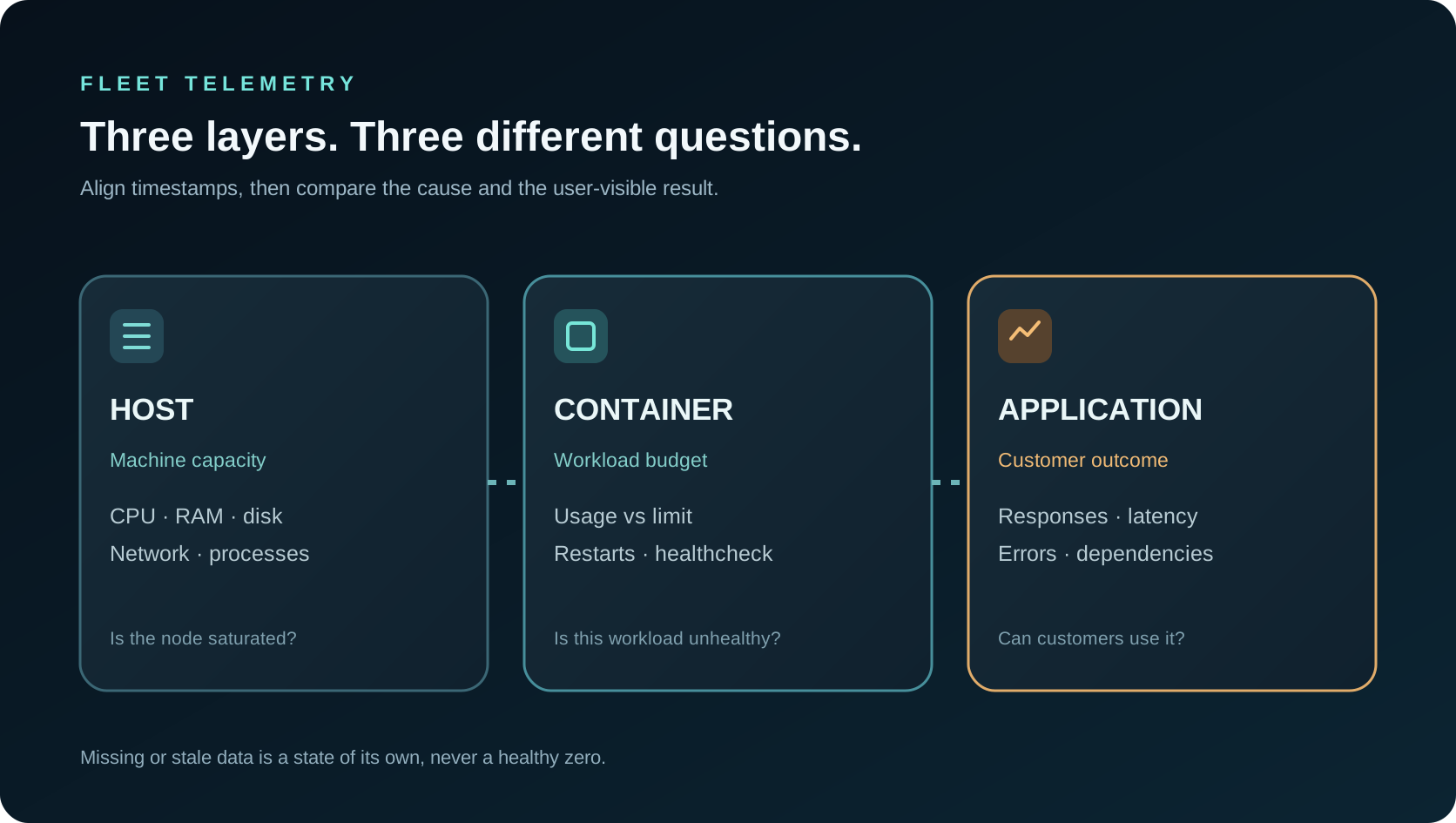
Host metrics describe the physical or virtual machine: CPU saturation, available memory, filesystem capacity, network ingress and egress, load and process health. Container metrics describe a cgroup and runtime object: CPU usage, memory usage against a limit, network and block I/O, process count and restart state. Application metrics describe the service contract: response success, latency, queue depth, database calls and healthcheck result. A dashboard that combines them without labels can blame the wrong layer. A container at 80 percent of its memory limit may be in trouble even while the host has free RAM; a healthy container process can still serve failing HTTP because its database is unavailable.
Collect at a bounded interval and record the timestamp at the source. On a laptop or intermittently connected node, a last-known value should remain visibly stale rather than silently changing to current. Use stable node and workload IDs instead of mutable container names alone, and retain the runtime type for troubleshooting. Avoid sending every low-level sample synchronously to a central API during high load. Aggregate where appropriate, cap queue size and show loss or delay. Logs and high-cardinality labels need their own limits; a compromised or noisy container should not consume the host's entire disk simply by writing repeated errors.
Normalize Docker and Podman metrics without erasing their meaning
Docker's stats command streams resource usage for running containers. Podman's stats command reports familiar CPU, memory, network, block I/O and process fields. Similar columns do not guarantee identical accounting. Docker documents that its Linux CLI subtracts cache usage from displayed memory while its API exposes values that consumers can interpret themselves. Rootless Podman can also have host and cgroup constraints that affect which counters are available. A collector should note source, units, sampling period and missing fields. It should not make a missing memory limit look like zero bytes of RAM or compare a cumulative network byte counter directly with a bytes-per-second rate.
For CPU, show both instantaneous utilization and a longer interval trend. A multi-core container may exceed 100 percent if the display expresses one full core as 100 percent, while a host percentage may be normalized across all cores; label the convention. For memory, include usage, limit and host availability, then make cache accounting clear in the details. For network I/O, derive rates from counters and handle resets after a container restart. For storage, distinguish writable layer growth, mounted volume usage and the host filesystem. These differences are not pedantry: they determine whether to resize a pod, clean a log directory, repair a service or add a host.

Join logs to the workload and the moment that matters
A restart counter says something changed; a log line can explain why. Retain a bounded window of structured application and runtime errors with node ID, workload ID, container instance, severity and timestamp. Capture enough context to connect a process exit to a healthcheck failure or a failed database call, while redacting tokens, session cookies and connection strings. Keep the newest raw lines separate from aggregate error counts. A chart of 10,000 errors may be complete for the selected window, whereas a panel showing 200 lines is an inspection sample. That distinction should appear in the heading, not only in a tooltip.
Correlate container symptoms with the reverse proxy and upstream. A rise in 502 could be caused by a restarting application, exhausted connection pool, DNS failure or a gateway change. A spike in 429 could be an application policy or a proxy rule. Group repeated exception signatures, then let the operator inspect representative events and impacted routes. Avoid grouping by the entire raw URL when query strings carry countless unique values. A workload dashboard is most useful when it can answer: which release started this error, on which node, with which upstream and for which customer-visible path? Its logs should support that answer without becoming an unbounded search index.
Represent services and dependencies, not just containers
A customer thinks in services: website, API, worker, database, cache and scheduled job. A runtime thinks in containers, pods, images and processes. Map the two deliberately. Record which host runs each service, which image digest is deployed, which ports are exposed, what healthcheck is configured and which data volumes it uses. Show Docker or Podman as an implementation detail on the workload card. If the same service has two replicas, the service health should show partial failure and the individual replica status. A single green count for “containers running” misses a degraded production service.
Dependencies explain why a healthy-looking process can still fail users. An API may be running while MongoDB is unreachable; a worker may be alive while its queue is stuck; a gateway may be reachable while the application returns 500. Show the dependency edge with a last-seen timestamp and an evidence link, not just an animated line. Do not infer service topology from port numbers alone when several workloads share a reverse proxy. Combine deployment metadata, runtime inventory and observed traffic carefully, and mark an inferred edge as inferred. An operator should be able to trace an incident from a public route to the service and node that actually served it.

Alert on sustained impact and explain data freshness
A single CPU spike is rarely a good page. A useful alert connects duration and impact: disk projected to fill before the next maintenance window, a container repeatedly restarting, a healthcheck failing across replicas, or elevated 502s on a critical route while upstream latency rises. Set different thresholds for a batch worker and a public API. Include the current sample time, affected service, baseline, duration and a link to the exact window. If the collector goes offline, alert on missing telemetry as missing telemetry; do not synthesize healthy readings. Maintenance windows and known deployments can suppress noise but should stay visible in the incident history.
Keep alert state reversible and auditable. An acknowledgement should not delete the evidence; a resolved state should show what recovered. If a rule proposes an automated action, require a separate authority check and health-based verification afterward. An alert for high memory is not permission to restart a database. Provide a manual runbook with safe checks, relevant logs and an escalation path. For multi-tenant service, one customer's alert history and node IDs must not leak into another customer's account or mobile push. The boundary starts at collection, continues through storage and applies to every dashboard query and notification.
Keep monitoring separate from deployment authority
Reading a container's metrics and restarting it are different privileges. Publishing an image, changing an environment secret or mounting a volume is more sensitive still. A host-side agent should enroll under the owner's workspace and report only its own node. Grant read-only observation before enabling operations. When an operator deploys an image, the plan should identify the target machine, pod or service, immutable image digest, changed ports, volumes, healthcheck and rollback version. The agent must verify a short-lived, scoped command rather than accepting an arbitrary instruction because the control plane can see it. A read-only contractor should never gain host execution through a dashboard link.
Docker and Podman also present different operational interfaces. Podman Quadlet can express managed systemd units, while Docker installations commonly use their own service and orchestration patterns. A publishing tool should report the runtime-specific apply result and the resulting health state. A request accepted by a queue is not a successful deployment. Show pending, applied, unhealthy and rolled-back outcomes with timestamps. Credentials for registries and databases stay in a dedicated secret boundary; avoid echoing them into log search or AI tool arguments. Hostwatch's private enrollment guide expands on the difference between account login, device identity and a permission to change a workload.

Roll out one node at a time and prove the data is useful
Start with one noncritical host and document its expected services. Compare dashboard CPU, memory and network readings with the runtime's own commands and the host's system metrics for the same interval. Stop and resolve unit differences or stale samples before you add more machines. Then deliberately stop a test container, fill a disposable test volume, produce a sample application error and disconnect the collector. The resulting dashboard should identify each condition and preserve the last healthy sample time. If a mobile view summarizes the fleet, confirm that it shows the same node state and evidence scope as the web view rather than a different filtered count.
Add the next server through an owner-controlled enrollment step, not by automatically granting access because it shares an organization name or provider account. Test a second, unrelated account against known device identifiers to confirm isolation. Compare Docker and Podman workloads using the same service-level questions while retaining runtime-specific details for troubleshooting. Finally, write down which signals are actually collected, which are planned and which require a separately licensed mitigation module. Hostwatch's compute onboarding and product overview describe the connection path and interface. A credible fleet dashboard grows from verified host evidence and explicit access, not from an impressive but untestable aggregate.
A useful Docker and Podman dashboard explains which host and service are unhealthy, how fresh the signal is, whether the host or container is the bottleneck, and who is authorized to act.