
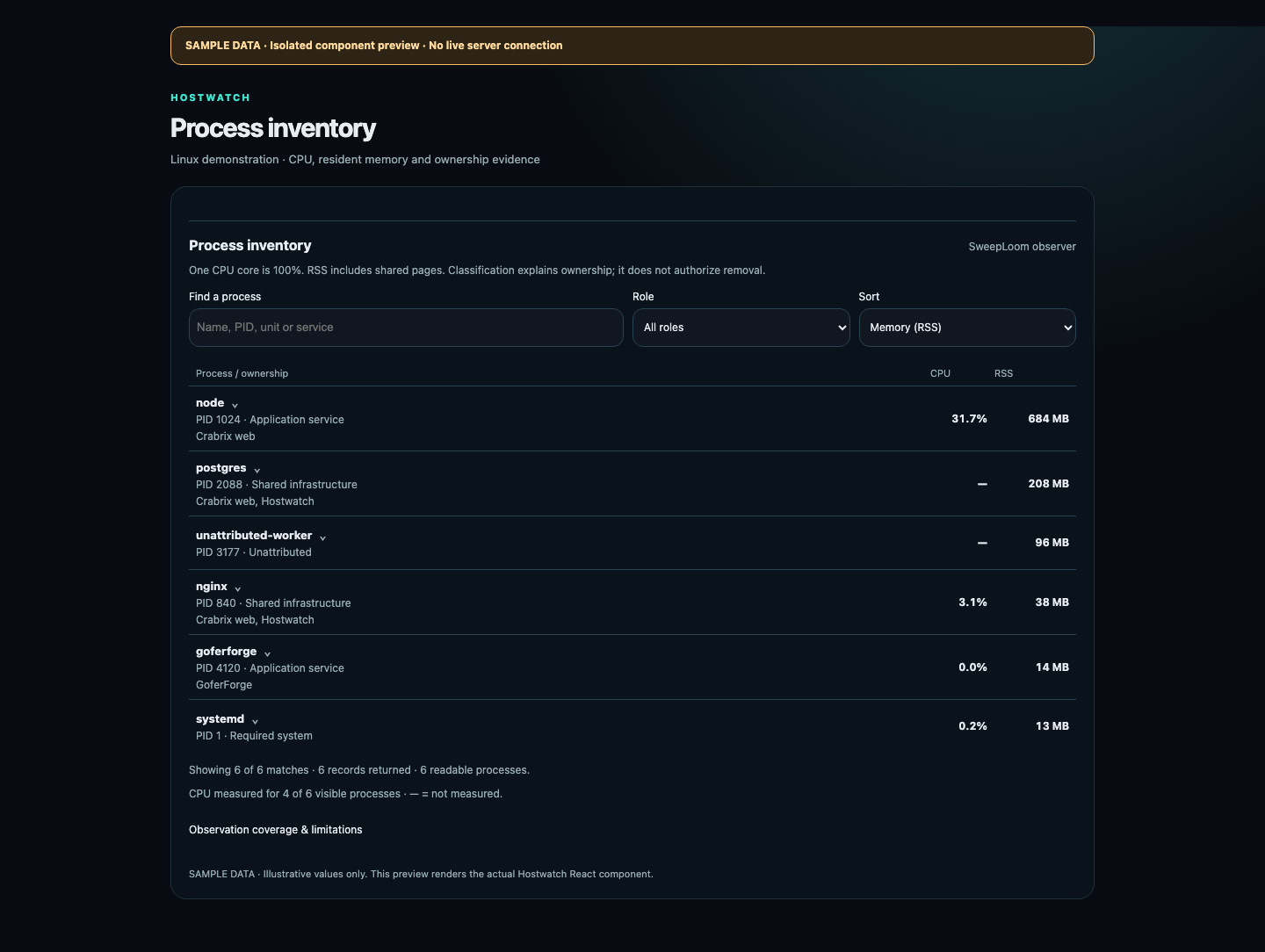
Open the server task manager
Choose a server, open Overview, then select CPU or Memory. CPU opens processes sorted by their observed CPU use. Memory also explains physical RAM, swap and the process RSS inventory. Refresh takes a new server snapshot.
Search by name, PID, service unit or recorded service. Filter by role and sort by CPU or RSS. Expand a row to inspect its identity, ownership evidence, service bindings, dependency coverage and maintenance guidance. Larger inventories load more rows explicitly.
Read CPU, RSS and unknown values correctly
One logical CPU core is 100%, so a process using several cores can exceed 100%. A dash means CPU was not measured; it is not a quiet zero. The coverage section states how many visible processes were sampled and which limitations apply.
RSS includes shared memory mappings in every process that maps them. Adding RSS does not produce physical RAM used by the server. Physical RAM, available memory and swap remain separate measurements. A short sample does not establish a service’s peak demand.
Linux observations bind a PID to boot identity and process start ticks and omit processes that exited or changed identity during sampling. The endpoint returns a bounded inventory. Short-lived or restricted processes can be absent; an observation is not proof that no other process exists.
Use ownership evidence before maintenance
Required system identifies protected operating-system processes such as PID 1 and kernel tasks. Shared infrastructure names recorded shared service consumers. Application service requires an installed unit or container binding and observed process membership. Unattributed means those facts have not been established.
The dependency details report observed systemd relationships separately from simple ordering. Their presence is evidence of a relationship, not a complete application dependency map. Unavailable coverage and unknown consumers stay explicit.
Classification explains what was observed. It does not authorize deletion or stopping. Hostwatch’s process inventory has no kill or delete control. Investigate an unknown process and its owners before proposing maintenance.
Separate process, readiness and public HTTPS
Open Recovery for the selected node. The independent watchdog can remain available when the main agent stops. Each installed target shows process state, its optional local readiness check and its optional public HTTPS check.
A ready application with an unavailable public endpoint is degraded. Hostwatch does not restart that application merely because DNS, TLS or public ingress failed. A sandbox-denied probe is unavailable observation coverage rather than proof of an outage. Missing checks are labeled instead of being presented as healthy.
Recovery can supervise installed systemd services and fixed Podman components. Where a systemd unit owns an attached container, recovery respects that unit. Shared Nginx is validated under the common writer lock before reload or start; failed validation preserves any running master. Automatic restoration of an unverified configuration copy is not implemented.
Review bounded recovery settings
New target policies are disabled by default. An authorized owner can enable restart recovery and select a cooldown and an hourly attempt ceiling. Recovery requires three failed observations and respects its startup grace period, dependencies, manual stops, paused containers and supervisor transitions.
Start at boot is a separate setting. Machine reboot is also separate and is not enabled by service recovery or by the MCP recovery-policy operation. Install target bindings and probe permissions through the operator’s reviewed setup; remote callers cannot supply commands, service units or probe destinations.
After enabling a policy, inspect the live state and recent recovery events. A requested restart is not a completed health check. Unknown observations need investigation, and repeated failures remain bounded by the configured allowance.
Install the observer and use MCP
The workspace’s one-command Linux installer selects AMD64 or ARM64, checks package SHA-256 values and installs the agent with the SweepLoom observer. It includes the observer’s MPL-2.0 license, exact corresponding source archive and dependency notices. Existing installations use an explicit upgrade; the installer does not replace an existing agent or install background software updates.
The observer is separately licensed. Its license does not change Hostwatch’s own product license or grant workspace access. Cloud access requires the applicable workspace subscription or trial; a privately delivered licensed Private Enterprise control plane needs no separate Cloud subscription.
Authorized account clients receive process names, PID/start identity, CPU/RSS and ownership evidence. Command arguments, environment values, working directories and executable paths are omitted from the public process response.
Use the same node identity in MCP. Read the snapshot and installed targets before a confirmed owner policy update. Component and file releases remain separate explicit build, publication and deployment operations; no CI/CD is required.
host_processes { nodeId: "selected-node" }
recovery_status { nodeId: "selected-node" }
recovery_policy { nodeId: "selected-node", args: { id: "installed-target", restartOnExit: true, startAtLogin: false, cooldownSeconds: 120, maxRestartsPerHour: 3 }, confirm: true }