
Choose a server and an approved profile
On the website, open Automations → Backups. On iPhone, open More → Automations → Backups. Select the connected server containing the database or service you want to protect.
Profiles are installed by your server operator after reviewing snapshot, restore and retention procedures. A server with no installed profile reports that backup control is unconfigured. Installing an agent does not invent a safe backup recipe.
- Choose the server first.
- Open its approved backup profile.
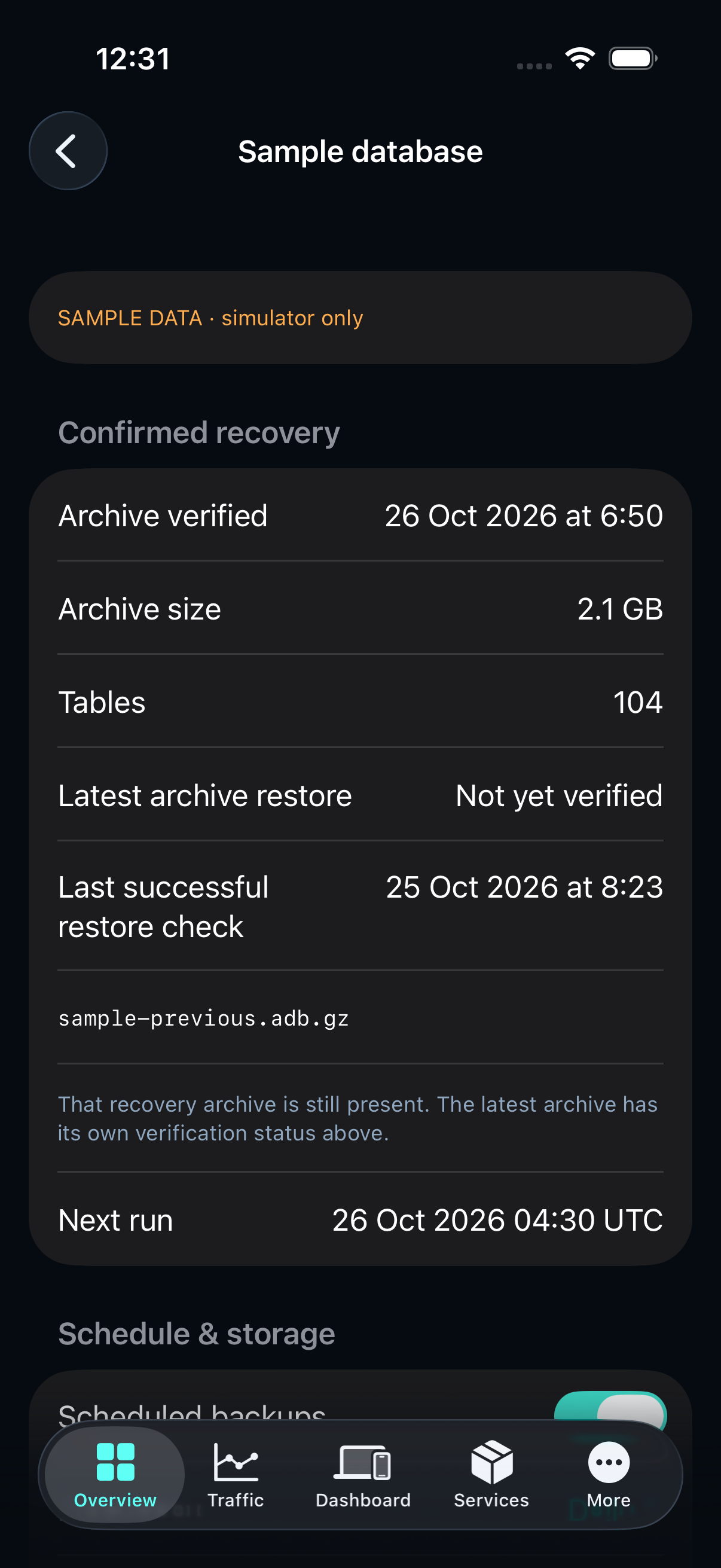
- Check the latest archive and separate full-restore confirmation.
Set schedule, retention and storage
An owner can enable a daily or weekly schedule, choose its time and IANA timezone, and decide whether missed runs should catch up. Retention is measured in days. Choose only a storage target already approved for that server.
Open Load & resource limits to set the free-space reserve, maximum host load, CPU, memory, IO weight and time budget. Save & verify settings applies them and reads back the real timer and executor. External changes appear as drift and block a run until reconciled.
Create a checked recovery archive
Create backup opens a preflight showing available space, required work space plus the reserve, eligible expiry estimates and host load. Reviewing preflight does not delete files.
Start backup creates a durable job. Queued and running mean work is in progress. Archive verified means the installed driver published a checked archive and the worker recorded its result. A new creation does not automatically prove full restore success.
Verify a full isolated restore
Verify isolated restore runs the approved restore procedure in a newly created private scratch directory. The source database is not a restore destination. Success requires the driver’s integrity, schema and table-data checks.
A restore may need more free space than archive creation. If preflight blocks it, keep the existing verified recovery point and provide adequate approved scratch capacity. Last successful restore check keeps the earlier archive, timestamp and availability separately from Latest archive restore. If that archive is missing or changed, its past proof is labeled historical rather than presented as an available recovery point.
When another existing server is needed
Use an operator-approved isolated verification destination with pinned archive identity, private restricted transfer, adequate scratch capacity, a free-space reserve and CPU/memory/time limits. Archive staging also consumes disk space. Missing destination bindings or capacity must block execution.
A service migration has separate consistency, writer, routing and reverse catch-up/rollback requirements. Register a reviewed execution template before a migration can run. Discovering a database or another connected server does not authorize a move.
Handle interrupted operations
The app and website retain the original operation UUID. Reopen its status after a lost connection. An unknown outcome is not a failed job that can safely be repeated with a new key.
An unresolved worker fences further backup operations for that profile. A server operator must inspect the exact unit and private journal before recovery. No automatic restart or deletion follows from a lost response.
Use the same controls through MCP
Search for backups to read the catalog. Inspect backup_preflight before backup_run or backup_verify, then follow backup_job to a verified result. backup_update requires the current revision and complete settings object.
Writes require owner access, hostwatch:write, confirm=true and the selected node’s governance permission. The API never returns keys or driver output.
backups → backup_preflight → backup_run / backup_verify → backup_job